
SHOPIFY APP · PRICING RULES & SAFETY NETS
Automate card pricing with a minimum you choose.
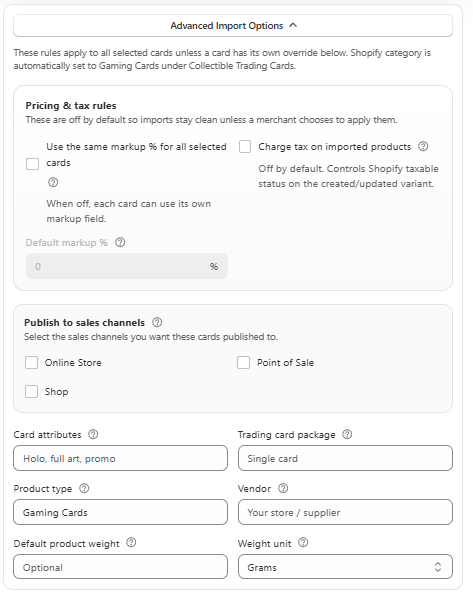
Market pricing is a starting point. Your costs and selling strategy matter too. Set supported markups, minimum-price protection and rounding rules to make TCG Importer pricing work for your Shopify store.
Start with five free product imports. Feature access and allowances depend on your plan.

Set a price floor
Safety Net Pricing prevents supported live-priced products from dropping below your chosen minimum.
Apply a consistent markup
Use a percentage rule where it fits your strategy instead of recalculating every listing manually.
Keep fixed campaigns separate
Choose manual pricing when a product should stay at a deliberate promotional price.
THE PROBLEM IT SOLVES
A market price does not know what your stock cost
Stores buy inventory at different costs. A market drop does not automatically make your previous purchase cheaper, and a percentage markup alone may not produce the selling price you need. A pricing workflow should let you choose where to follow the market and where to set a limit.
Safety Net Pricing works with supported products that have Live Pricing enabled. When the calculated live price falls below the configured minimum, the safety net protects that minimum selling price. Markup, currency conversion and rounding settings are separate parts of the workflow and should be reviewed together.
A WORKFLOW YOU CAN REPEAT
How it works in your store
Work out your minimum
Consider the acquisition cost, selling costs and your own target return. Enter a price floor that reflects the product rather than copying one value across unrelated stock.
Choose a pricing method
Use supported live pricing with a markup and safety net for market-driven products. Turn off syncing when a manual, fixed-price campaign is the better choice.
Check the final result
Test a small selection and review the resulting Shopify prices. Confirm currency and rounding settings before applying the approach more broadly.
FOR STORES & VENDORS
A floor can protect the price without fixing it forever
Imagine a calculated live price of $8.50 and a configured safety net of $10.00. The minimum protects a $10.00 selling price in this simplified example, with currency and rounding effects excluded. If a future calculated price rises above the floor, the price can follow the configured live-pricing rules instead. These are illustrative figures, not a recommendation for a particular card.
BEFORE YOU INSTALL
Pricing rules & safety nets: your questions answered
Does the safety net work with manual prices?
Safety Net Pricing is designed for supported products with Live Pricing enabled. For a fixed campaign, review manual pricing and turn off syncing where appropriate.
Can markup and a safety net work together?
Yes. They serve different purposes: a markup adjusts the pricing calculation and a safety net protects your configured minimum.
Can I use rounding and price endings?
The documented pricing settings include rounding rules and optional endings such as .95 or .99. Review how your selected settings affect the final price.
Does a safety net protect my profit automatically?
It protects a configured minimum selling price, not your accounting profit. You must choose the minimum with your actual costs in mind.
BUILD YOUR WORKFLOW
Explore the connected features
BUILT FOR SHOPIFY TCG STORES
Try the workflow with your own catalogue.
Start with a small selection, review the result in Shopify, and choose the plan that fits how your store works.